
Saw an aftermarket HUD device on Amazon for $50 that projects your speed and navigation onto the windshield. Looked futuristic and cool. Promised “safer driving by keeping eyes on road.”
I drive a 2011 Civic without any fancy tech. Thought this would be a cheap way to feel like I’m driving a luxury car. Plus maybe actually be safer?
Bought one. Used it for two months. Spoiler: it’s a $50 gadget that does nothing your dashboard and phone already do, just in a slightly different place that’s actually kind of distracting.
Returned it and saved my money. My car has a speedometer. It works fine.
The Short Answer
For most people: No, aftermarket HUD devices aren’t useful.
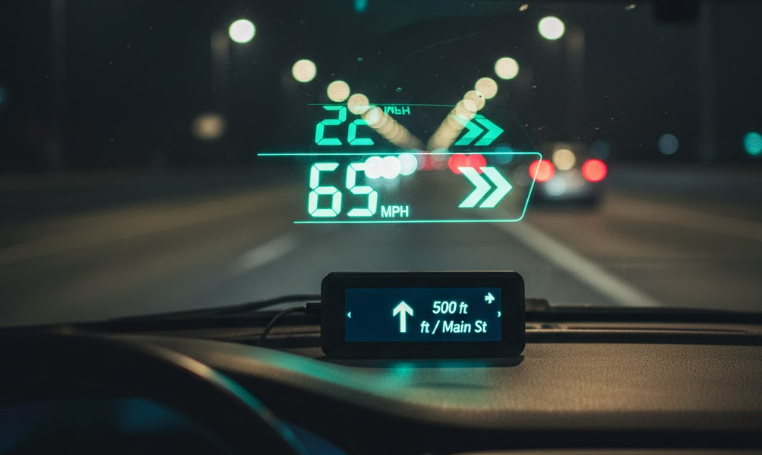
They project basic info (speed, navigation, maybe RPM) on your windshield. Your dashboard already shows this. Your phone already does navigation. You’re paying $40-150 for redundant information in a new location.
Factory HUDs in luxury cars are actually good. Aftermarket bolt-on devices are gimmicks.
I wasted $50 and two months learning this. You can skip that step.
What These Devices Actually Do
Aftermarket HUD devices come in a few types:
Phone projection HUDs ($20-40) – Plastic thing that holds your phone and reflects screen onto piece of film. Basically a mirror.
OBD-II connected HUDs ($40-80) – Plug into OBD port, pull speed/RPM data, project onto windshield or clear plastic screen.
GPS-based HUDs ($60-150) – Have built-in GPS, show speed and basic navigation. Don’t need OBD connection.
All-in-one HUDs ($100-200) – Multiple functions, phone connectivity, fancy features. Usually overcomplicated.
I bought an OBD-II one for $50. Plugged into port under dash, projected speed and RPM on windshield.
My Experience Over Two Months
Week 1 – Cool factor phase. Felt like I was in a fighter jet. Showed everyone. They were mildly impressed for 10 seconds.
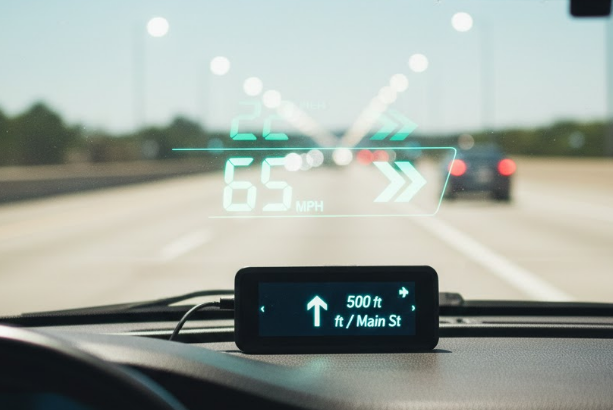
Week 2-3 – Novelty wearing off. Started noticing issues. Display was dim in sunlight, too bright at night. Had to constantly adjust settings.
Week 4-6 – Realized I was still glancing at regular speedometer anyway out of habit. The HUD wasn’t replacing anything, just adding duplicate information.
Week 7-8 – HUD became annoying. Numbers floating on windshield actually distracted me. Started turning it off during drive.
Return process – Unplugged it, packaged it up, got refund. Immediately felt less cluttered.
Never installed anything in my car again based on “cool factor” alone.
The Problems With Aftermarket HUDs
Visibility issues:
- Washed out in direct sunlight
- Too bright at night even on lowest setting
- Difficult to see with polarized sunglasses
- Rainy weather makes projection blurry
My HUD was basically invisible on sunny days. Completely pointless when I actually needed to see it.
Placement problems:
- Takes up windshield space
- Can be in your actual line of sight (bad)
- Or positioned awkwardly to side
- Leaves marks on windshield
Couldn’t find sweet spot. Either blocked my view or was positioned where I had to look away from road to see it. Defeated the “safety” purpose.
Information overload:
- Shows data you don’t actually need
- Speed is on your speedometer already
- RPM is on your tachometer already
- Navigation is on your phone already
I already know how fast I’m going. Don’t need it projected in two places.
Technical issues:
- OBD connection sometimes glitchy
- GPS-based ones had lag
- Phone projection ones looked terrible
- All of them needed constant adjustment
Mine would randomly disconnect from OBD port and shut off mid-drive. Super annoying.
Distraction factor:
- Bright numbers on windshield pull your attention
- More things to look at = less focus on road
- Opposite of the claimed safety benefit
I found myself staring at the HUD numbers instead of actually watching traffic. Made driving less safe, not more.
Factory HUDs vs Aftermarket
Factory HUDs (BMW, Mercedes, Mazda, etc):
- Actually integrated into windshield
- Proper brightness and positioning
- Shows relevant info clearly
- Worth the upgrade in new car
Aftermarket HUDs:
- Bolt-on gadget
- Never quite right
- Cheap feeling
- Not worth the money
Factory HUDs work because they’re engineered specifically for that car and windshield. Aftermarket ones are generic devices trying to work everywhere and succeeding nowhere.
Friend has factory HUD in his Mazda3. It’s actually useful. Well-positioned, clear display, minimal distraction.
My $50 Amazon gadget was nothing like that.
The “Safety” Marketing Is BS
Aftermarket HUDs claim to improve safety by letting you see speed “without taking eyes off road.”
Reality check: Your speedometer is already in your line of sight. Glancing down takes 0.1 seconds.
The HUD doesn’t eliminate this glance – it just moves where you glance to. Still looking at numbers instead of road.
Worse, bright projection on windshield can actually be more distracting than quick glance at dashboard.
I never felt safer with HUD. If anything, felt more distracted trying to read dim numbers on windshield versus quick glance at clear speedometer.
For Navigation
Some people claim HUDs are great for navigation directions.
Your phone already does this. Mount it on dash or vent. Same effect, works better, costs less.
GPS-based HUDs with navigation cost $100+. Phone mount costs $10.
The projection doesn’t make navigation better. It’s still just arrows and text, but now on windshield instead of screen.
I tried using HUD for navigation once. Couldn’t see directions in sun. Went back to phone mount immediately.
Different Types I’ve Seen
Phone reflection type – Literally just plastic holder and reflective film. Looks terrible, like watching reflection in funhouse mirror. $20-30.
OBD-II basic – What I had. Shows speed/RPM pulled from car computer. $40-60. Works but pointless.
GPS standalone – Has its own GPS, doesn’t need OBD connection. $60-100. Better than OBD type but still not worth it.
Premium with features – Does everything. Costs $150-200. Way overpriced for what you get.
None of them are worth it. Just use your dashboard and phone.
Installation Hassles
Even “easy install” HUDs are annoying:
OBD-II type:
- Find OBD port (usually under dash)
- Plug in device
- Route wire to wherever you mount display
- Secure display on dashboard or windshield
- Calibrate settings
- Adjust position constantly to find right spot
GPS type:
- Mount on dashboard
- Plug into cigarette lighter
- Wait for GPS signal
- Calibrate
- Adjust brightness constantly
Phone holder type:
- Install film on windshield
- Mount phone holder
- Hope sun angle works
- Deal with terrible image quality
Installation isn’t hard but it’s more effort than it’s worth for device you don’t actually need.
The Display Quality Issue
Aftermarket HUDs use cheap projectors. Image quality is poor.
Common problems:
- Fuzzy edges on numbers
- Color fringing
- Dim output
- Low resolution
- Washed out appearance
My HUD’s numbers looked crisp at night but like vague blobs during day.
Factory HUDs use much better projection technology. Aftermarket ones use whatever cheap projector fit in the budget.
Battery And Power Concerns
Some GPS HUDs have built-in batteries. This creates new problems:
- Battery dies and needs recharging
- Another device to remember to charge
- Battery degrades over time
- In hot car, battery can swell or fail
OBD and cigarette lighter powered ones draw from car. Usually fine but:
- Takes up OBD port (might need for other things)
- Takes up 12V socket (can’t charge phone)
- Small parasitic drain when car is off
I had to unplug mine when car sat for more than a week to avoid battery drain.
For Different Types Of Drivers
Commuters – Don’t need this. You know your speed. Phone navigation works fine.
Uber/Lyft drivers – Phone mount for navigation more practical than HUD.
Enthusiasts – If you want data, get proper gauges or phone app. HUD won’t satisfy you.
Tech lovers – Save money for actual useful car tech. HUD is disappointing.
People with bad vision – Bigger font on phone screen more helpful than HUD projection.
Can’t think of any driver type that actually benefits from aftermarket HUD.
Cost vs Benefit Analysis
Aftermarket HUD: $40-150 What you get: Speed and maybe navigation projected on windshield What you save: 0.1 second glance at speedometer Actual value: Basically zero
Phone mount: $10-15 What you get: Navigation right in front of you Actual value: Actually useful
Properly maintaining your car: $0-50 for basic maintenance What you get: Safe reliable transportation Actual value: Literally everything
Spend your money on things that matter. Oil changes, tires, brakes. Not novelty gadgets.
What People Think They Want vs Reality
Think they want: Cool futuristic display like luxury cars have.
Reality: Cheap gadget that looks nothing like luxury car HUD and adds no actual value.
I thought I wanted this. Turned out I just wanted my car to feel fancier. A $50 gadget didn’t accomplish that.
Know what makes car feel nicer? Keeping it clean and well-maintained. Way cheaper than gadgets.
The Reviews Are Misleading
Amazon reviews for HUDs are often positive. Why?
Initial impressions – People write review after one day. Still in novelty phase. Haven’t discovered problems yet.
Sunk cost – Spent $50, want to believe it was worth it. Give positive review to justify purchase.
Low expectations – If you expect garbage, mediocre seems great by comparison.
Incentivized reviews – Some sellers offer discounts for reviews.
Long-term reviews tell different story. People stop using them after few weeks but don’t update their review.
I almost wrote 5-star review after day one. Glad I waited.
What Actually Improves Driving
Instead of $50-150 on HUD:
Dash cam ($50-80) – Actually useful for accidents and incidents.
Good phone mount ($10-15) – Better navigation visibility than HUD.
Tire pressure gauge ($15) – Maintain proper tire pressure, improve safety.
Emergency kit ($30-50) – First aid, flashlight, tools. Actually helpful in emergency.
Quality wiper blades ($30-40) – See better in rain. Actual safety improvement.
All of these provide more value than HUD device.
For People With Factory HUD
If your car came with built-in HUD, that’s different. Use it if you find it helpful.
But don’t buy aftermarket device to add to car that doesn’t have one. Not the same experience.
Factory HUDs are optional equipment you pay $1000-2000 for when buying new car. At that price you get proper engineering.
$50 Amazon gadget can’t replicate that experience.
My Current Setup
No HUD device. Just use what the car came with:
- Speedometer shows speed
- Tachometer shows RPM
- Phone mount shows navigation
- Dash cam records drive
Simple, functional, no unnecessary gadgets.
Car feels less cluttered. One less thing to adjust, charge, or troubleshoot.
Don’t miss the HUD at all. In fact, driving is less distracting without it.
What I’d Tell Someone Considering One
Don’t buy it unless you have $50 you want to waste on novelty gadget you’ll use for a week.
The “safety” claims are marketing BS. Having speed projected on windshield doesn’t make you safer.
Your dashboard already shows everything these devices show. You don’t need duplicate information.
Save your money. Buy something that actually improves your car or driving experience.
I was tempted by cool factor. Learned that cool factor wears off in days but wasted money stays wasted.
The Real Answer
Aftermarket HUD devices are not useful for most people.
They’re novelty gadgets that solve problems you don’t have by showing information you already see elsewhere.
Factory HUDs in luxury cars are actually good. Aftermarket bolt-on devices are cheap imitations that don’t deliver the same experience.
Save your $50-150. Spend it on car maintenance, good tires, or a proper dash cam.
Or just save it. Not everything needs a gadget solution.
I returned mine after two months and never thought about it again. Car works exactly the same without it, just with less clutter.
Technology for technology’s sake isn’t useful. HUD devices are perfect example of this.
Your car already tells you how fast you’re going. You don’t need it projected on your windshield too.